Desktop Tracker
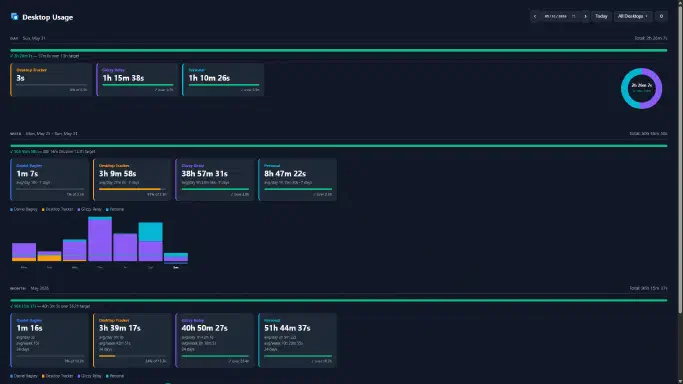
I work across several Virtual Desktops throughout the day — one for deep work, one for Slack and email, one for whatever side thing I’m poking at. The problem: I had no idea where my time was actually going. Time-tracking tools track apps or windows, not desktops. I wanted desktop-level granularity.
So I built Desktop Tracker. It’s a Windows system tray app that silently watches which Virtual Desktop is active and logs time against it. At the end of the day it syncs totals to BambooHR so the hours show up in the right place without me having to manually enter anything.
How it works
The core of the app is pyvda — a Python wrapper around the undocumented Windows Virtual Desktop COM interfaces. It polls the active desktop on a short interval, detects switches, and accumulates time per desktop. Idle detection (no mouse/keyboard input) pauses tracking so a desktop sitting behind a locked screen doesn’t rack up hours.
The tray icon is a small SVG baked into a Python Icon object via pystray. Right-click gives you a quick summary of today’s totals without opening anything. The BambooHR sync runs at end-of-day (configurable) and posts hours via the BambooHR Time Tracking API — one API call per desktop that has any logged time.
Distribution is a single .exe via PyInstaller so there’s nothing to install or maintain on the target machine.
Why
Manual time tracking is a friction tax. The more steps between “do the work” and “log the work,” the less accurate your data gets. This removes all of them — you set up your desktops once, name them something meaningful, and forget about it.
The BambooHR integration is the part that actually matters day-to-day. Hours flow in automatically, managers see accurate time without reminders, and I never have to context-switch into a timesheet UI.